
A power bank that can charge a laptop has nothing to do with what the plug looks like. What matters is whether it supports the USB Power Delivery (USB PD) protocol and can deliver power at the voltage and wattage your laptop actually needs.
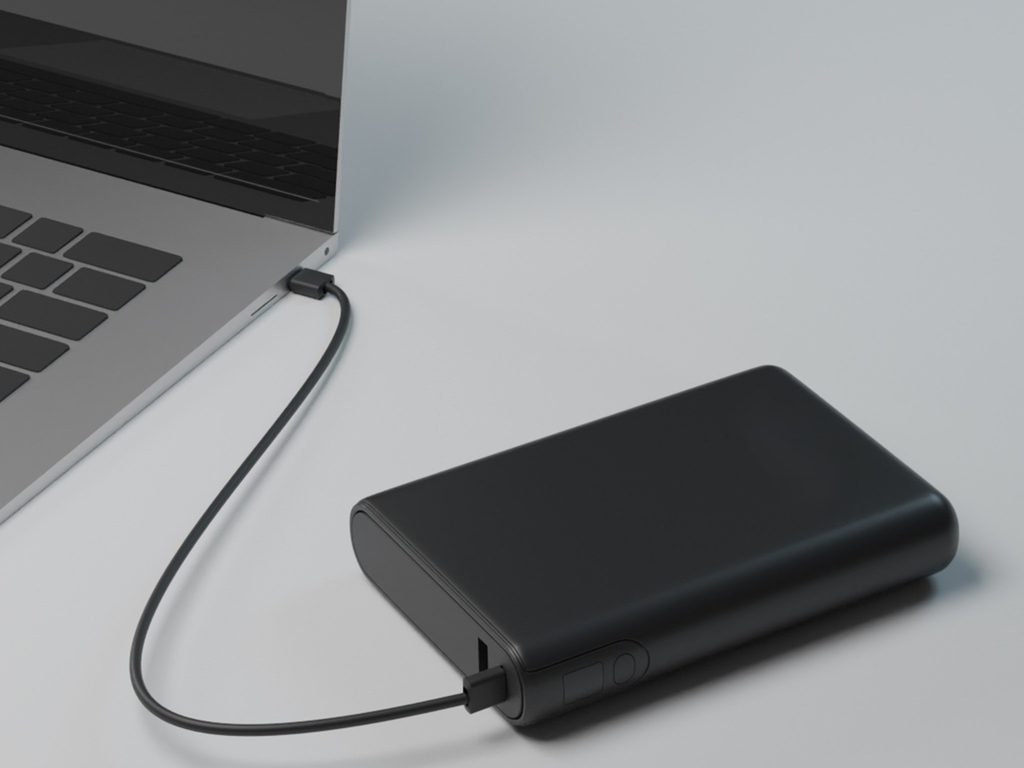
Phones run happily on 5 volts and just a few watts. Laptops are a different story. The battery sits behind a charging circuit that expects voltage and power close to the original adapter's output, usually 15 or 20 volts at several dozen watts.
Many people assume switching to a USB-C port solves everything. In reality, USB-C is just the name of the connector. The port may only carry data, only output video, only charge, or do all three, and there is no way to tell from the outside.
To fix this, you rely on the USB PD protocol. When charging starts, the power bank first presents a menu of voltage and current options. This menu has a formal name, the Power Data Object (PDO). The laptop picks one of the options it supports, and only after both sides agree does real power flow. If they cannot agree, charging never starts. So the power ceiling is set by the laptop: a power bank rated at 140 watts cannot force 140 watts into a laptop that only asks for 65 watts.
Cables are part of the protocol too, so you cannot just grab any cable. A standard USB-C cable is usually limited to 3 amps, which works out to at most 60 watts at 20 volts. To go beyond that, you need a 5-amp cable, which contains an electronic marker chip. For anything above 100 watts, you also need a cable that meets the EPR standard.
Finally, do not confuse capacity with power. The milliamp-hour (mAh) rating describes the capacity of the cells, not the energy you can actually use. A typical 20,000 mAh power bank holds about 74 watt-hours before conversion losses. When the battery voltage is boosted to 20 volts, another 15% to 30% of the energy is lost as heat.
The test is simple. Start with the adapter that came with your laptop. The number printed on it, such as 30W, 45W, 65W, 96W, or 140W, is the target wattage you need to meet.
In general, the laptops below can safely be charged from a power bank:
Step one: ignore the flashy fast-charge wording and the total output wattage on the box. Instead, read the output wattage printed for each individual USB-C port.
You want a port that explicitly lists USB-C PD support, with output voltages that include 15 volts or 20 volts, and wattage no lower than your laptop adapter's rating. If the label only says 5V/3A, you can be pretty sure it is a phone port.
A few more details worth checking:
For most people, a 65-watt PD power bank is the reassuring minimum. A 100-watt PD power bank covers the charging needs of nearly every non-gaming laptop.
Do not panic. Work through the checklist one item at a time. Faults almost always come down to four things: the port, the cable, the power bank, or the load.
Case one: nothing happens when you plug in. First make sure you are using the laptop's charging port, and that the power bank side is plugged into an output port. If the power bank has a power button, press it. Swap in a cable rated for your target wattage. You can also shut down the laptop, wait half a minute, reconnect the power bank first, and then connect it to the laptop.
Case two: it connects, but the laptop reports slow charging, or the battery percentage stops climbing. That means the handshake succeeded, but the actual wattage is below what the laptop expects. Compare the power bank's single-port output against the number on the adapter label. Close a few resource-heavy apps, lower the screen brightness, and test again while idle. If the battery only gains charge when the lid is closed, the power bank simply cannot keep up with the laptop's running load.
Case three: charging keeps cutting in and out. For a compact power bank asked to deliver 100 watts for a long stretch, overheating protection is common. Let it rest and cool down. Also check whether a phone plugged in at the same time is hogging the port and forcing constant power renegotiation.
Case four: you expect 100 or 140 watts but only get around 60. This is the limit of a 3-amp cable. Switch to a 5-amp cable with an E-Mark chip, or use an EPR cable rated above 100 watts. Before blaming the laptop, test with a direct cable first, which is the most reliable check.
Also, laptops from Dell, HP, and other brands may show a warning even while the battery is clearly charging. Some manufacturers reserve full-speed charging above 100 watts for their own chargers and a proprietary identification signal. When you see this message, you can usually choose to ignore it in the firmware settings.
If none of these steps solve the problem, the cause may be hardware: the laptop's port does not accept PD input, the power bank cannot provide 20 volts, or the laptop uses a proprietary round barrel connector. In that case, swapping to a different power bank will not help either.
Anyone who wants to take photography seriously will eventually face the same question: should you buy a DSLR or a mirrorless camera? Some people are captivated by the direct, transparent world seen through a DSLR viewfinder, while others cannot live without eye-tracking autofocus and a silent shutter on a mirrorless camera. Where exactly do the two differ, and which one suits you better?
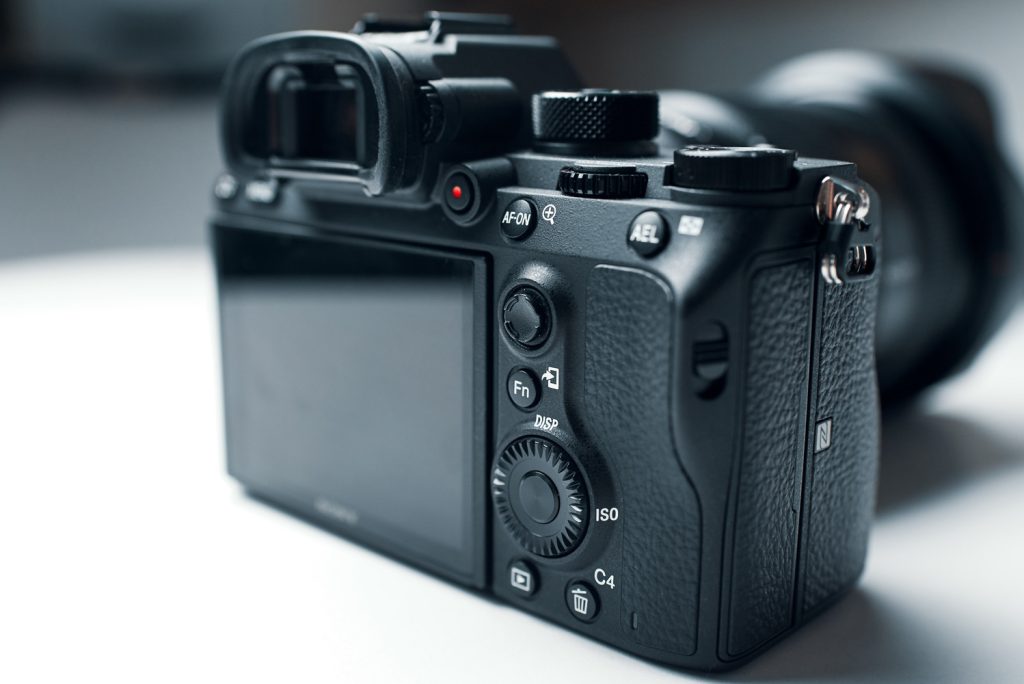
Let us start with the DSLR. DSLR stands for digital single-lens reflex camera. When you take a photo, light passes through the lens, strikes the reflex mirror inside the body, and is reflected up into the optical viewfinder. What you see is no different from what you saw in the era of film cameras. The instant you press the shutter, the mirror flips up, the light falls onto the sensor, and the photograph is captured. That crisp "click" remains, for many people, the definitive sound of a "real camera".
The mirrorless camera takes a completely different path: it removes the mirror altogether. Light passes through the lens and lands directly on the sensor. What you see in the viewfinder is a small screen showing, in real time, exactly what the sensor "sees". There is no pentaprism and no mirror box. No mechanical structure is needed any more to relay the scene between your eye and the photograph.
It may be nothing more than the removal of a single mirror, yet every difference between the two stems from this one decision.
Once the mirror is gone, how does the day-to-day experience of the two cameras change?
Let us begin with the viewfinder. The greatest advantage of an optical viewfinder is immediacy: there is no lag, no refreshing, and it consumes no power no matter how long you look through it. The strength of an electronic viewfinder is that what you see is what you get. Before pressing the shutter, you can preview the effects of brightness, white balance and depth of field right in the viewfinder. A histogram can be called up when needed, and both focus peaking and manual-focus magnification are genuinely useful. The trade-off is that it draws more power, and on some entry-level models the electronic viewfinder can show noise or slight lag in dim conditions.
Next, autofocus, an area where the situation has shifted remarkably fast. Only a few years ago DSLRs still held the upper hand, but the picture has now completely reversed. A modern mirrorless camera can turn almost the entire frame into an autofocus area, and recognition and tracking of human eyes, faces, animals and subjects have truly become practical. A flagship DSLR launched in 2020 still offers excellent phase-detection autofocus, but its focus points are mostly clustered near the centre of the frame, and its intelligent tracking only keeps pace with the help of newer software. Whether you shoot sports, children, birds in flight, or any subject whose movement is hard to predict, today's mirrorless cameras make life considerably easier.
Video capability is even more clearly the home turf of mirrorless. DSLRs can of course record video, but mirrorless cameras were designed from the outset to bypass the obstacle of the mirror: there is no mirror to lock up, and autofocus is never interrupted. Nowadays, reliable continuous autofocus, better codecs, Log profiles and higher frame rates come as standard on almost every mirrorless camera. Put the other way round, as long as video makes up even twenty per cent of your shooting, a mirrorless camera will serve you far better than a DSLR.
Body size and speed are two more areas where the two pull apart. Removing the mirror box means a shorter flange distance, and the body can usually be made smaller as well. Lenses, however, do not necessarily shrink along with it, so a "compact" full-frame kit does not necessarily mean a light one. In terms of speed, mirrorless cameras offer faster burst shooting, and the electronic shutter can be completely silent. Quietness, of course, comes at a price: under artificial lighting, the electronic shutter can introduce image distortion and banding.
Then there is battery life, where the DSLR's advantage is plain to see and remains its most solid strength today. An optical viewfinder consumes almost no power, and it is entirely normal for a DSLR to capture 800 to 1,500 shots on a single charge. A mirrorless camera, by contrast, must keep the viewfinder, the sensor and the stabilisation system on standby all day, and typically manages 300 to 700 shots per charge, shrinking further in cold weather. Carrying a few spare batteries eases the problem, though it cannot cure it entirely.
Finally, let us talk about lenses and the second-hand market, which is often what really determines the long-term investment. Canon's EF mount and Nikon's F mount have accumulated decades of history, and both systems are vast and mature. Second-hand bodies and lenses are remarkably affordable, and with the help of adapters many of those lenses can continue to serve on mirrorless bodies. That said, the new native mounts, Canon RF, Nikon Z, Sony E and Fujifilm X, are where every manufacturer is now designing its new lenses.
The market has already spoken volumes. According to CIPA statistics, global shipments of mirrorless cameras in 2025 were around 6.3 million units, while DSLRs reached only around 691,000. Neither Canon nor Nikon has released a new DSLR model since 2020, and Pentax is the only manufacturer still persisting with the format.
After this full circle, we return to the original question: which one is better? If you look purely at photographic results, whether you shoot landscapes, portraits or street scenes, the work produced by a good DSLR and a good mirrorless camera is almost impossible to tell apart. What truly determines image quality is the size of the sensor and the lens, not whether there is a mirror inside the body.
If you already own a complete set of EF or F mount lenses, or if you spend most of your day shooting with your eye to an optical viewfinder, then carrying on with a DSLR is perfectly fine. It remains dependable.
If you are a complete beginner, or if you will shoot video, or if eye-tracking and a silent shutter matter a great deal to you, then rest assured and join the mirrorless camp. The development of new lenses and firmware updates for camera bodies are now concentrated there.
If you plan to own only one camera, the answer is even more straightforward: choose mirrorless. Development of the DSLR platform has essentially come to a halt, and the entry-level DSLRs still on sale mostly come from Canon, largely as existing stock, with the product line continuing to shrink.
One last thought. Choose a body that matches your actual needs, pair it with a good lens, and tuck a spare battery into your bag. Body technology is renewed year after year, while a good lens can accompany you for many, many years of shooting.
If battery life is your top priority and you want a phone that can reliably last a full two days, the Moto G86 Power 5G remains a solid choice even as the end of 2026 approaches. It is no longer the newest model in Motorola’s lineup, but a year has not diminished its biggest advantage: a 6,720 mAh battery. More impressive still, the phone does not feel like a brick despite that battery. In hand, it is considerably lighter than expected.
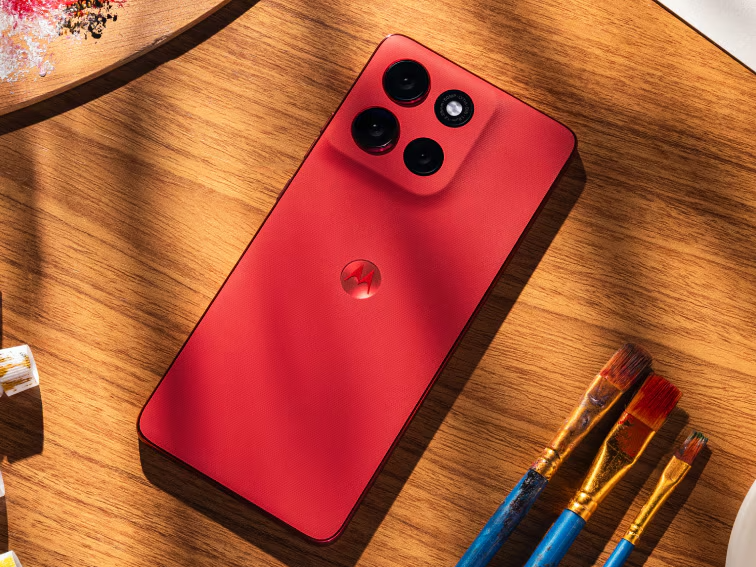
Motorola launched this Power model about a year ago, and its core specifications still hold up today:
On the software side, it shipped with Android 15, and Motorola has promised two major Android upgrades along with security updates through June 2029. That support period is not especially long for a budget phone, but it is enough to keep the phone from feeling obsolete too soon.
On Wi-Fi, its battery life comes close to 27 hours, a major advantage over the standard G86 with its 5,200 mAh battery and roughly 17 hours. For typical mixed daily use, charging every two days is entirely realistic. If you only use it lightly over the weekend for messages and browsing, you may not even need to think about bringing a charger.
Charging is the only real weakness. It supports 30W fast charging and reaches about 20 percent in 30 minutes. Plugging it in before bed and leaving with a full battery in the morning is perfectly workable. However, if you are already used to much faster charging, this pace can feel frustrating.
The Dimensity 7300 handles everyday navigation, social apps, and photo processing smoothly, and it can also run lightweight games. It does get warm under sustained heavy loads, and Wi-Fi supports only a single channel, so local file transfers are slower than the advertised numbers suggest. None of this meaningfully affects everyday use.
Below $300, very few phones combine an OLED panel, a 120Hz refresh rate, and excellent outdoor visibility. Even Motorola’s own G Power line still uses an LCD display. Keep in mind that this screen has the same low-frequency dimming flicker found on other OLED panels in its class. If you are sensitive to that, it is worth trying the phone in person before buying.
The Sony main camera produces sharp, detailed photos in daylight with natural colors. The ultrawide camera’s macro performance is also more pleasing than its specs suggest. Its zoom capability is average at best, low-light photos are merely passable, and there is no telephoto lens. Those shortcomings were easier to accept at launch. By 2026, rivals in the same price range have started to catch up in camera specs.
It comes in attractive Pantone colors, and some versions use a vegan leather finish, but the plastic frame still feels somewhat cheap to the touch. The software experience is generally clean, with some common promotional apps preinstalled, although they are not too intrusive.
The Moto G87 launched in May this year as the nominal successor to the G86 Power. It brings newer software, a larger display, a higher-resolution main camera, and a lighter, thinner body, while retaining solid durability ratings.
Look closer, though, and its drawbacks become clear. Motorola swapped the Dimensity 7300 for the lower-tier Dimensity 6400, which actually means a step backward in performance. Battery capacity also dropped from 6,720 mAh to 5,200 mAh, leading to noticeably shorter battery life. Put simply, the G87 is a lighter, slimmer phone that places more emphasis on photography, but it makes that trade at the cost of both battery life and performance.
The price gap is substantial as well. The G87 launched in Europe at about €399 and in the United Kingdom at close to £350. The G86 Power, meanwhile, has fallen from £300 to roughly £230, while an unlocked imported version in the United States comes in at around $250. The newer model costs more while offering a weaker battery and a weaker processor, so the value calculation is easy.
As for other competitors, the Samsung Galaxy A16 and A17 can be found for $150 to $200 during sales. Their screens and battery life are not as strong, but they receive longer software support. The Pixel 9a and 10a are the opposite: battery life is shorter, but camera quality and software support are far better. They are also considerably more expensive, still costing $400 or more during promotions.
If you are considering an imported version, check the supported frequency bands first. The G86 Power supports the common bands used by GSM carriers such as T-Mobile and Mint, but it is not certified for Verizon. It is not a good idea to use it as your main phone on Verizon.
If you are on a limited budget and battery life matters most to you, the answer is yes. The G86 Power remains the strongest battery performer in its price class, while its performance and display also hold their own.
However, if you need local U.S. warranty coverage, a headphone jack, expandable storage, or software updates beyond 2028, it may not be the right phone for you.
If you own a Switch, or you are browsing a second-hand listing that simply says "Switch", you are not necessarily looking at the same machine. Nintendo has released several distinct hardware versions. Some differences are obvious, while others are hidden in the fine print.
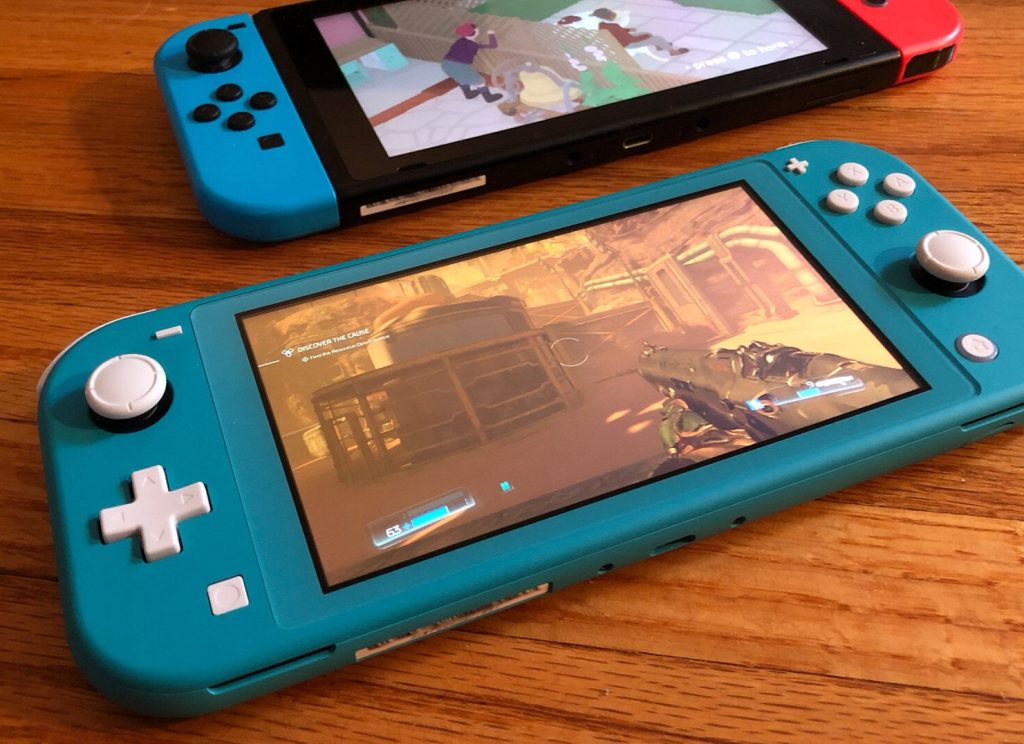
This is a buying guide: it covers each version, what has actually changed, and how to identify your console in just a few minutes.
This hybrid console kicked off the Switch era. It features detachable Joy-Con controllers, a 6.2-inch 720p LCD screen, 32GB of internal storage, and a kickstand that feels like an afterthought. Battery life is officially rated at roughly 2.5 to 6.5 hours. Inside, it runs on the "V1" / Erista board.
The casing, 6.2-inch LCD screen and 32GB of storage are identical to the original. The main improvement is internal: a more efficient Tegra chip. Battery life rises to roughly 4.5 to 9 hours. This upgrade was remarkably quiet, and it looks identical to the first version, although the packaging is usually more red-toned than the earlier white-fronted boxes. Serial numbers for this version typically begin with XKW rather than XAW or XAJ.
Handheld only. The buttons are built in, there is no TV dock, and the Joy-Con controllers cannot be detached. It has a 5.5-inch 720p LCD screen. It is lighter, cheaper, and offers around 3 to 7 hours of battery life.
This is the flagship version of the original hybrid console. The upgrade centres on the screen: a 7-inch OLED panel at the same 720p resolution. Storage is doubled to 64GB, and it also gets louder speakers, a wide adjustable stand, and a dock with a wired Ethernet port. Battery life is broadly the same as the 2019 revision. There is no meaningful performance gain either, though games do look better in handheld mode.
An entirely new generation of console. It has a larger 7.9-inch 1080p LCD screen, with support for high refresh rates, HDR and VRR in handheld mode.
Special editions (Animal Crossing, Mario, OLED variants and the like) differ almost entirely in paintwork and packaging. Check the model number, not the colour scheme.
1. Start in Settings.
Home → System Settings → System → Console Information. You should see Nintendo Switch, Nintendo Switch Lite, Nintendo Switch – OLED Model, or Nintendo Switch 2.
2. Check the model number on the console itself.
You will find HAC-001, HAC-001(-01), HDH-001, HEG-001, or BEE-001.
3. Check the serial number label.
On first-generation hybrid consoles, the serial number is usually on the bottom edge. You can also open System → Serial Number Information in Settings.
Second-hand consoles frequently lack their serial number labels. If a seller is charging a premium for the rare V1 revision, be sure to ask for a clear photo of the back label and the full serial number. Bear in mind that a refurbished board can end up inside an older shell.
If you want a phone that can survive mud, rain, concrete, and a full week off the grid, the Rock series was built exactly for that. The Rock 1 launched in November last year, and barely a month later Blackview followed up with the Rock 2. So this is hardly a true upgrade in the traditional sense. Blackview added a few new features to the Rock 2, but quietly dropped some of the original hardware as well.
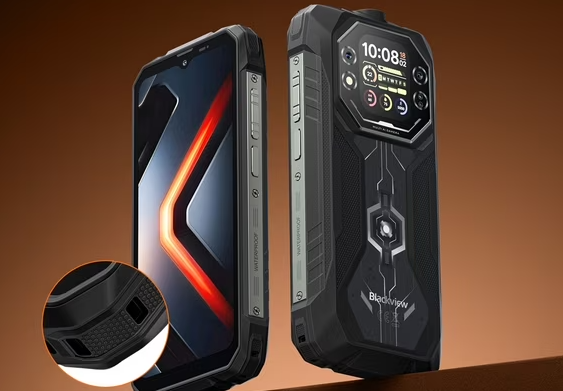
Neither of these phones slips easily into a pocket. The Rock 1 measures 177.9 x 83.5 x 24.7 mm and weighs 490 grams. The Rock 2 is bigger in every way, and its weight climbs to 548 grams.
In terms of protection, both phones perform exactly the same. Each can shrug off dust, high-pressure water jets, and immersion in water up to 1.5 meters deep. On top of that, both offer glove mode, underwater shooting, and a side-mounted fingerprint sensor.
In other words, durability is identical no matter which one you pick. The real differences come down to the screen, performance, and cameras.
The Rock 1 uses a 6.56-inch HD+ IPS main display, plus a 2.01-inch secondary screen on the back. That rear display is its most distinctive design touch. You can check the time, read notifications, or trigger the flashlight shortcut without ever flipping the phone over.
The Rock 2 drops the second screen but enlarges the main display to 6.67 inches, still an HD+ IPS panel. With the bigger screen, swiping feels smoother and outdoor visibility improves a bit. That said, neither phone has a particularly high pixel density, so do not expect the kind of crispness you get from flagship devices.
If you have a soft spot for the dual-screen design, the Rock 1 is currently the only model in the series that still offers it.
Performance is where this update actually matters. The Rock 1 runs on a MediaTek Helio G81 built on a 12nm process, paired with either 6GB or 8GB of RAM and 256GB of eMMC 5.1 storage. That setup is enough for map navigation, WhatsApp, and some lightweight apps, but it only supports 4G networks.
The Rock 2 upgrades to a UNISOC T8100 built on a 6nm process, with RAM bumped up to 8GB or 12GB and storage swapped for the faster-responding UFS 2.2. In everyday use, apps open noticeably faster, read and write operations feel smoother, and it adds support for 5G networks. If you regularly rely on mobile networks to transfer files in the field, this difference will directly affect your experience.
The two models take different paths on cameras. The Rock 1 pairs a 16-megapixel main camera with a 20-megapixel night vision camera, plus a 13-megapixel front camera. That night vision lens is its core selling point for outdoor use, ideal for dark trails, campsites, and job sites after sunset.
The Rock 2 also has a 16-megapixel main camera and a 13-megapixel front camera, but next to the main shooter it keeps only a single auxiliary camera, with no dedicated night vision module. In bright daylight, photo quality from the two phones is close. Once the light drops, the Rock 1, with its dedicated night vision hardware, still holds a real advantage in specific situations.
Battery life is nearly a tie. Both phones pack a massive 15000mAh battery and support 33W wired fast charging along with 5W reverse charging. Whether you are topping up the phone itself or lending power to another device in a pinch, the setup is exactly the same.
Endurance still differs slightly. The Rock 1 has a smaller, dimmer screen with a 90Hz refresh rate, so it lasts a bit longer in lab testing. The Rock 2, with its 120Hz high-refresh display and 5G modem, consumes more power overall and falls a little short. Given the identical battery capacity, that gap is not dramatic in real-world use.
Taking everything into account, each phone has a clear audience.
If you want a rear display, night vision, a slightly smaller body that is easier to hold, and you have no need for 5G, the Rock 1 is the better fit. Its overall specs are hardly aggressive, but the combination of features has more personality, and it stands out as the unique one in the series.
If you care more about 5G connectivity, a brighter 120Hz screen, faster storage, and more RAM, go with the Rock 2. The trade-offs you accept are a larger, heavier body, plus the loss of the secondary display and the night vision camera.